IDPhotoStudio

IDPhotoStudio is a program that will create and print passport sized photos for you in a snap.

Top Recommended Alternative

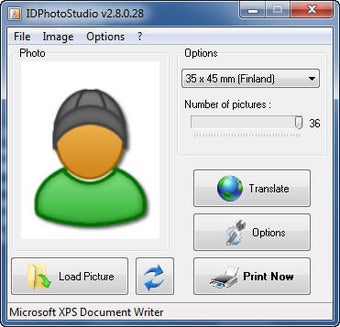
Featuring only the bare necessities, IDPhotoStudio, will handle the job in seconds, allowing you to drag and drop your picture onto the interface. You can then select between three ID Photo sizes: US, Canada or France. Because you often need a certain number of photos printed out, IDPhotoStudio has a little drag meter to let you select how many photos you’ll need, from 1 to 15. Click on the print button to get the paper copies of your photo.

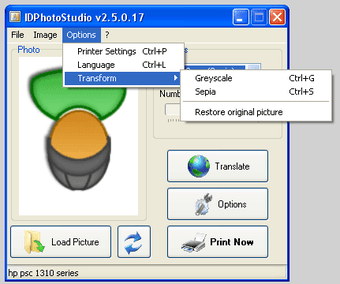
IDPhotoStudio is an original idea, and it’s good to see someone come up with a program to quickly print out ID photos. However, the application left us disappointed for a number of reasons. First of all, it doesn’t respect the aspect ratio of photos, so if you drag a large image there’s a risk it’ll appear distorted. Also, when it comes to editing functions, IDPhotoStudio only includes the option to apply sepia or monochrome color filters. We would have preferred if it included tools like a red-eye remover, cropping or contrasting, which are much more useful for improving the quality of pictures. IDPhotoStudio doesn't even include an undo feature, meaning that if you accidentally set your image to greyscale when you'd prefer it in color, you'll need to start over.

If you have a good mug shot of yourself and want to quickly print out a set of passport sized photos, IDPhotoStudio will probably suit you. However, the lack of advanced editing features means you’ll never really be guaranteed with a high quality image of yourself.


  • Pros

    • Auto-set photo size
    • US, Canada and France ID photo sizes
    • Print from 1 to 15 photos
  • Cons

    • Almost no photo editing capabilities
    • Doesn’t respect aspect ratio
 0/2

App specs

Program available in other languages


Icon of program: IDPhotoStudio

IDPhotoStudio for PC

  • Free
  • 3.6
    545
  • 132.9K
  • V2.16.5.75

User reviews about IDPhotoStudio

3.6

1 reviews

Add review

Main reviews for you

  • Anonymous user

    Malware - do not download. This free software has THREE hidden malware files that Avira anti virus flagged. The software looks great but the developers are severely at fault Cons: malware

More

You may also like

Alternatives to IDPhotoStudio

Explore Apps

Latest articles

Laws concerning the use of this software vary from country to country. We do not encourage or condone the use of this program if it is in violation of these laws.
Softonic

Is IDPhotoStudio safe?

100/100

Score result: Clean

This file passed a comprehensive security scan using VirusTotal technology. It is safe to download.

  • Virus free
  • Spyware free
  • Malware free
  • Verified by Security Partners

    VirusTotal logo

Scan Info

Last scan
Monday, August 19, 2024
Scan provider
VirusTotal · Full report

File Integrity

File
IDPhotoStudio_V2.16.5.75.rar
SHA256
4a061630e8e2b4446515fadaaf2f9b8c322b7c04ef943b3addd29d3b20180442
SHA1
ea824765c86161f58904994de5995bb80d5060ca

Softonic security commitment

IDPhotoStudio has been thoroughly scanned by our advanced security systems and verified by industry-leading partners. This file comes from the official developer and has passed all our security checks, showing no signs of viruses, malware, or spyware. For more information, visit our Security and Trust Center